
SEO for tradies: how to get found on Google in your service area
A practical SEO guide for Australian tradies: Google Business Profile, service pages, honest area pages, reviews, licence details and how to measure it.
Start with a complete Google Business Profile set up as a service-area business, then give each service you want more of its own page with real scope, areas, photos and your licence details. Ask every customer for a review the same way after each job, and add your own job photos as you go. Then check Search Console every month or so to see which searches you appear for. It takes time: Google says some changes show within hours and others take months, and nobody can guarantee a ranking.
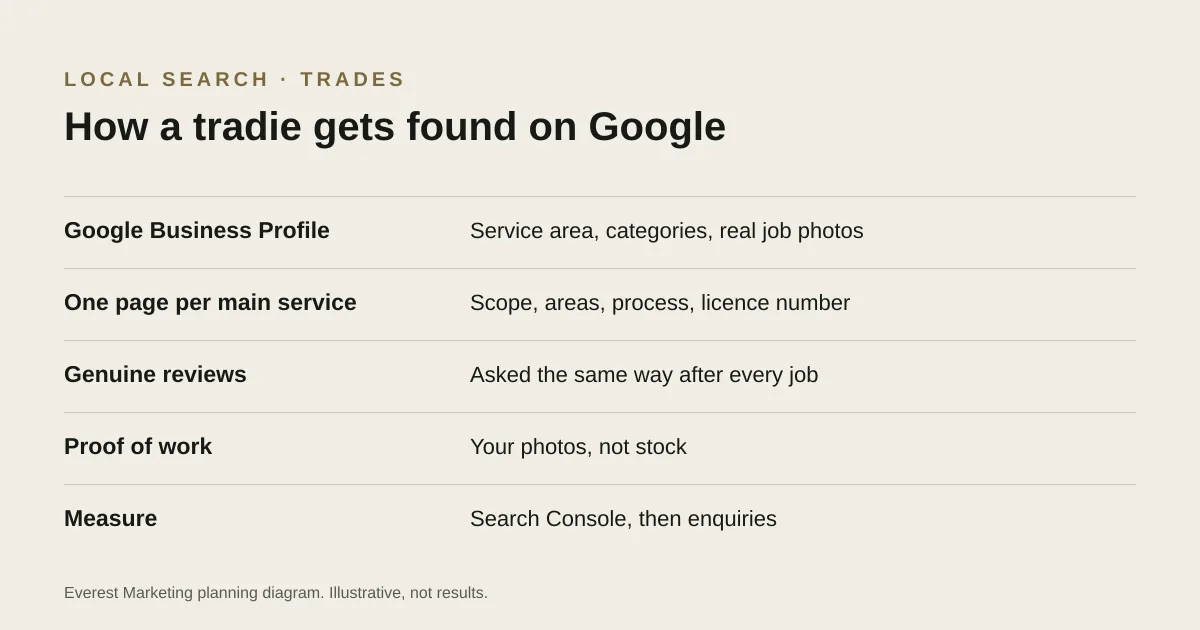
Most of what helps a tradie show up on Google is not technical. It is being clear about what you do, where you do it and what your work looks like, in the places Google reads. This guide covers the parts that tend to matter for trade businesses, in the order we would tackle them.
What people actually search for
Tradie searches tend to fall into three groups, and each needs something slightly different from your site. These examples are illustrative, not measured search volumes.
| Kind of search | Example | What the searcher wants |
|---|---|---|
| Urgent | “blocked drain plumber Parramatta” | Someone available now, nearby, with a phone number they can tap |
| Planned | “bathroom renovation Hills District” | Proof of similar work, what is included and a way to request a quote |
| Research | “how much does it cost to rewire a house” | A straight answer, so they can budget before they call anyone |
Urgent searches can be answered by the map results, which come from your Google Business Profile. Planned and research searches are where your own service pages and guides earn their keep.
Get the Google Business Profile right
For many local searches, the Business Profile can be the first thing a customer sees. Google’s guidelines say that if you visit customers rather than having them come to you, you are a service-area business and should hide your address, and that a virtual office or mail drop is not eligible unless it is staffed during business hours.
- Set it up as a service-area business and list the areas you genuinely cover.
- Choose the primary category that matches the work you most want, then a few accurate secondary ones.
- Use your real business name, without adding keywords or suburbs to it.
- Add photos of your own work and team, and keep adding them.
- Keep hours and phone number accurate, including public holidays.
Our Google Business Profile basics guide covers the setup in more detail.
Give each service its own page
A single “Services” page listing everything you do gives Google, and customers, very little to go on. A page for each service you want more of lets you answer the questions people ask before they call.
- What the job involves, and what it does not include.
- The areas you cover for this service, if they differ from your others.
- Photos of jobs you have actually done, with a short caption saying what was done.
- Price guidance if you can give it honestly, even a typical range or what affects the price.
- Your licence details where the law requires them (see below).
- One clear next step: call, or a short quote form that asks only what you need.
For naming, sizing and describing those photos, see our guide to image SEO for service businesses.
Service-area pages without the shortcuts
It is tempting to make one page per suburb with the suburb name swapped in. Google’s spam policies describe pages “targeted at specific regions or cities that funnel users to one page” as doorway abuse. A separate area page earns its place only if it says something genuinely different: jobs you have done there, local access or parking issues, different call-out times. If you would not have much to say, list your areas on the service page instead.
Reviews: ask everyone, the same way
Reviews help people choose between tradies. Google’s policy does not allow offering anything in exchange for a review, or asking only the customers you expect to be happy. Our guide to asking customers for Google reviews has wording you can copy.
Licence details on your website (NSW)
In New South Wales, Fair Trading guidance says the licensee’s name and licence number must be shown in all advertising for building and trade work, and lists the internet among the media this covers. It also asks for the licence category and a business phone number. If you work in another state, check your own regulator’s rules; they are not the same everywhere. Showing the details clearly is also a trust signal for customers who check the public register.
A worked example
This is hypothetical, to show the order of work rather than a client result. An electrician in north-west Sydney wants more switchboard upgrades and fewer small call-outs. They fix their Business Profile (service-area business, accurate categories, recent job photos), then build a switchboard upgrade page covering what is involved, why older boards get replaced, typical timeframes, the suburbs they cover and their licence details, with photos from real jobs. They ask every customer for a review the same way, and check Search Console each month to see whether “switchboard upgrade” searches start showing up. If nothing moves after a few months, they look at what the pages that do appear are covering that theirs does not.
How to tell whether it is working
- In Search Console, watch impressions and clicks for the searches you care about, not total traffic.
- In your Business Profile, look at calls and direction requests over a few months.
- Most importantly, track enquiries and booked jobs by source, so you know which pages bring work in. Our guide to tracking leads from click to customer shows how to connect the stages.
SEO or Google Ads first?
If you need calls next month, ads are likely to be faster; if you can wait, SEO costs time rather than money per click. Our SEO vs Google Ads guide walks through the choice, and Google Ads for tradies covers the paid side. For the bigger picture of winning trade work online, see marketing for tradies.
Sources
- Guidelines for representing your business on GoogleGoogle Business Profile Help, accessed 28 October 2026. Service-area businesses should hide their address; virtual offices are not eligible unless staffed
- Spam policies for Google web search: doorway abuseGoogle Search Central, accessed 28 October 2026
- Maps user-generated content policy: fake engagementGoogle, accessed 28 October 2026. No incentives for reviews; no discouraging negative reviews or selectively soliciting positive ones
- Building trade advertisementsNSW Government (Fair Trading), accessed 28 October 2026. Licensee name and licence number in all advertising, including the internet. NSW only; other states have their own rules
- SEO Starter GuideGoogle Search Central, accessed 28 October 2026
- Do you need an SEO?Google Search Central, accessed 28 October 2026. Source for: no one can guarantee a #1 ranking; Google never accepts money to rank sites; advertising with Google does not affect organic results