
Image SEO for service businesses: getting your project photos to work
How a service business can make project and portfolio photos work in search: alt text, file names, sizes and formats, and where photos go on the page.
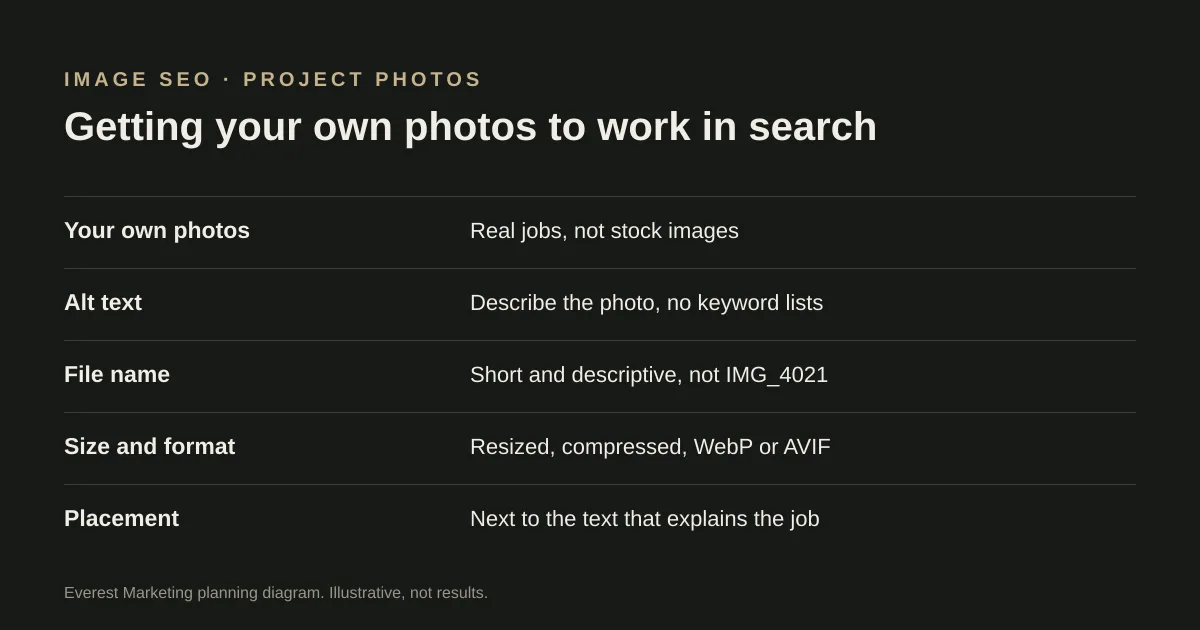
Use your own photos of real jobs, place each one next to the text that explains it, and give it alt text that describes what the photo shows in plain words. Use short, descriptive file names instead of camera names like IMG_4021. Resize and compress photos before uploading, and use modern formats such as WebP or AVIF where your platform supports them. Put photos in normal image elements, not as CSS backgrounds, so search engines can find them.
Photos of finished work are some of the most useful content a service business has. They show a customer what you actually do, and they are something no competitor can copy honestly. But a gallery of large, unlabelled photos named IMG_4021.jpg does little for search and can slow the page down. This guide covers the handful of things that matter, based on Google’s own image guidance.
Start with your own photos
Stock photos appear on many other sites and say nothing about your work. Photos of real jobs, your team and your finished results tell a customer more and give your pages something distinct. Before you publish photos of a customer’s home, business or face, get their permission.
Write alt text that describes the photo
Alt text is a short description in the image’s code. Screen readers read it aloud, and search engines use it, along with the surrounding text, to understand the image. Google warns against filling alt text with keywords.
| Alt text | |
|---|---|
| Too vague | Bathroom |
| Keyword-stuffed | Bathroom renovation Sydney bathroom renovator best bathroom renovations Sydney cheap |
| Useful | Renovated bathroom with a walk-in shower, floor-to-ceiling grey tiles and a timber vanity |
Describe what someone would see. Mention the suburb only if it is genuinely part of what the photo shows, such as a project caption, not as a habit on every image. Purely decorative images can have empty alt text so screen readers skip them.
Name files before you upload them
Google recommends short but descriptive file names. Rename IMG_4021.jpg to something like walk-in-shower-grey-tiles.jpg before uploading. Keep it short; a long string of keywords in a file name does not help.
Resize and compress
Google notes that images are often the largest part of a page’s size, which can make pages slow. Phone photos are usually far larger than any website needs.
- Resize to roughly the largest size the photo will actually be shown at. A photo shown 1,200 pixels wide does not need to be 4,000.
- Compress before uploading, or check that your platform does it for you.
- Use modern formats such as WebP or AVIF where your platform supports them. Google Search supports both, along with JPEG and PNG.
- Serve smaller versions to phones. Many platforms do this automatically using responsive images (the srcset attribute). If yours is custom-built, ask your developer whether it does.
The diagram at the top of this page, for example, is a WebP image served at two widths so phones download the smaller one.
Put photos where they explain something
Google recommends placing images near relevant text and on pages relevant to what the image shows. A photo of a finished deck does more on your decking page, next to a short note about the job, than in a general gallery with hundreds of unrelated photos. A good project write-up has a few photos, each with a one-line caption: what the job was, what was involved, and roughly where.
Make sure search engines can find them
- Use normal image elements. Google says it does not index images set as CSS backgrounds. Check this for sliders and hero banners in particular, which are sometimes built with background images.
- Avoid hiding photos behind clicks or scripts that only load after interaction, if you want them found.
- Image sitemaps can help Google find images it might otherwise miss. A small site whose photos sit on normal, linked pages may not need one.
If you are writing up a finished job with photos, our free case study template includes a section for captions and permission.
A quick audit of your existing photos
- Are the photos your own work, with permission where needed?
- Does each photo have alt text that describes it, without a keyword list?
- Are file names descriptive rather than camera defaults?
- Is the page reasonably quick on a phone? PageSpeed Insights will flag oversized images.
- Is each photo near text that explains the job?
Images are one part of a page that works in search. For the rest, see our technical SEO checklist and, for trades, SEO for tradies.
Sources
- Google image SEO best practicesGoogle Search Central, accessed 28 October 2026. Alt text without keyword stuffing, descriptive file names, images near relevant text, img elements rather than CSS images, srcset
- SEO Starter GuideGoogle Search Central, accessed 28 October 2026