
Google Ads for tradies: a setup that brings in the jobs you want
How tradies can set up Google Ads around the jobs they want: urgent and planned work, service areas, negative keywords, call tracking and a budget ceiling.
Build campaigns around the specific jobs you want, keep urgent and planned work apart, and target only the areas you actually cover. Check the search terms report regularly and exclude the searches that will never become work, such as jobs, DIY and training. Make calls easy and count them, so phone enquiries are not invisible in your results. Work out the most you can afford to pay for an enquiry before you set a budget, and judge results on booked jobs, not clicks.
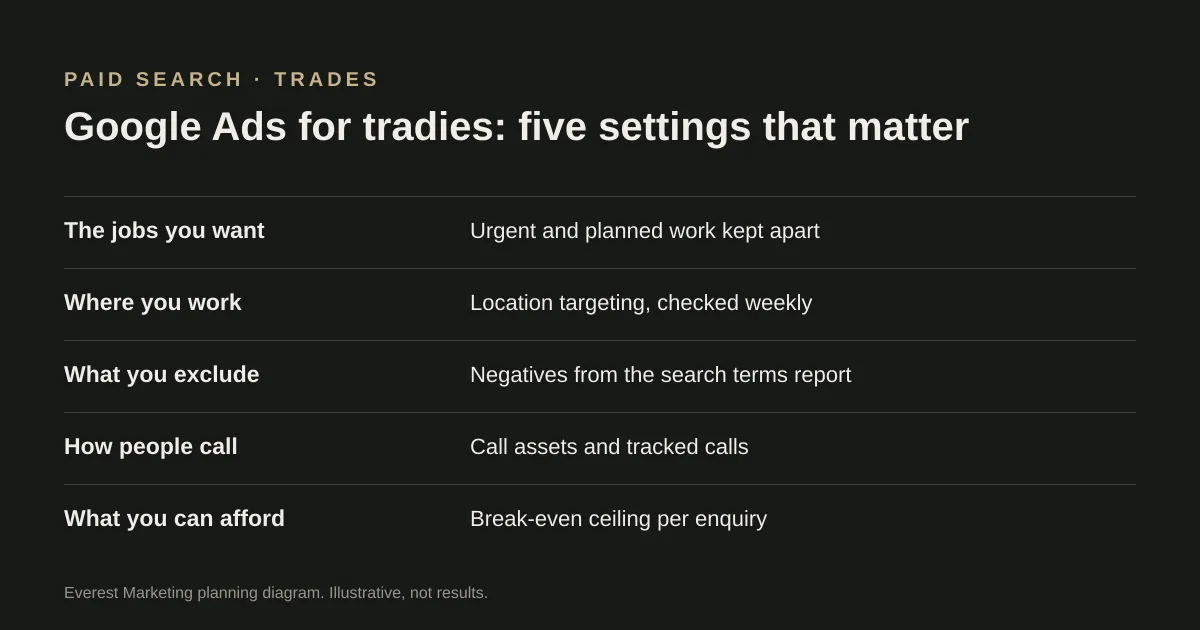
Google Ads can put a tradie in front of someone at the moment they search for the job. It can also spend money quickly on searches that were never going to become work. The difference is mostly in a handful of settings, which this guide walks through. Settings and labels in Google Ads change, so check the current interface as you go.
Start with the jobs, not the keywords
Write down the two or three jobs you most want more of, what each is worth to you, and whether it is urgent or planned. Urgent and planned work behave differently, so they are easier to manage as separate campaigns.
| Urgent work | Planned work | |
|---|---|---|
| Example | Burst pipe, power outage, lockout | Bathroom renovation, switchboard upgrade, new deck |
| How people contact you | Often a phone call, straight away | A quote request, often after comparing a few providers |
| What the ad needs to say | Available now, the areas you cover, a phone number | What is included, proof of similar work, how quoting works |
| Where the click should go | Straight to a call, or a short page with the number up top | A page about that specific service |
| When to run it | Only when someone can answer the phone | Whenever you can respond within your usual timeframe |
Target the areas you actually cover
Google Ads lets you choose between showing ads only to people in your target areas (“Presence”) and also to people who have shown interest in them (“Presence or interest”). Google recommends the broader option as a general best practice for Search. For a tradie, the trade-off is that interest-based targeting can reach someone at work in the city who needs a plumber at home, but it can also reach people who will never be in your area. Whichever you choose, check the locations report and the addresses on your enquiries every week or two, and tighten the setting if leads keep coming from outside your patch.
Exclude the searches that will never become work
The search terms report shows the actual searches that triggered your ads. Google suggests using it to find negative keywords. Common categories for trades are below, but check every one against your own report: “cheap”, for example, might be a search you want.
- Jobs and training: apprenticeship, salary, TAFE, course, licence test.
- DIY and how-to: how to fix, DIY, YouTube, tutorial.
- Parts and wholesale: supplier, wholesale, parts, Bunnings.
- Services you do not offer, and areas you do not cover.
Review the report weekly at first. In a small account it is one of the most useful habits you can build.
Make calls easy, and count them
Call assets add your phone number to your ads. Google’s call reporting uses forwarding numbers to show which calls came from your ads, and calls can be counted as conversions. Without this, a campaign that produces phone work can look like it produces nothing. Only run call-focused ads in hours when someone will answer.
For form enquiries, record a conversion only when the form has actually been accepted, not when the button is pressed. Our guide to tracking leads from click to customer explains why that distinction matters.
Send each click to a page that matches the search
Someone who searched for hot water repairs should land on a page about hot water repairs, with your service areas, proof of work and phone number near the top. Sending every click to the homepage makes them hunt for it. Google also takes landing page experience into account in its ad auction.
Set the budget from your numbers
Before choosing a daily budget, work out the most you can pay for an enquiry and still make the job worth doing. The advertising break-even calculator does this from your job value, costs and close rate. Then compare it with what you are actually paying, using the qualified lead cost calculator. Google sets click prices in a live auction, so there is no reliable fixed price per lead to plan around; our Google Ads cost guide explains how costs work.
A worked example
This is hypothetical, to show the reasoning. A plumber wants more blocked drain call-outs in a few western Sydney suburbs and more hot water system replacements. They run two campaigns: an urgent one with call assets, scheduled only for hours they answer the phone, and a planned one sending clicks to a hot water replacement page. In the first fortnight the search terms report shows clicks for “plumbing apprenticeship” and “how to unblock a drain yourself”, so those become negatives. Calls are counted through call reporting, and each Friday the owner notes which calls became booked jobs.
Checklist before you switch it on
- Campaigns built around specific jobs, with urgent and planned work separate.
- Location targeting set to the areas you cover, and a plan to check the locations report.
- A starter list of negative keywords, and a weekly slot to review search terms.
- Call assets added, calls counted, and an ad schedule that matches when you answer.
- Each ad group sending clicks to a matching service page.
- A form conversion that fires only on accepted enquiries.
- A maximum cost per enquiry worked out from your own numbers.
Considering Facebook instead, or as well? Our comparison of Meta Ads and Google Ads and the Facebook Ads budget guide for tradies cover the other side, and SEO for tradies covers the unpaid results.
Sources
- About advanced location optionsGoogle Ads Help, accessed 28 October 2026. “Presence or interest” versus “Presence”; Google recommends the broader option as Search best practice
- Find negative keyword ideas with the search terms reportGoogle Ads Help, accessed 28 October 2026
- About call assetsGoogle Ads Help, accessed 28 October 2026. Call assets add a phone number to ads; call reporting uses Google forwarding numbers and can count calls as conversions
- Actual cost-per-click (CPC)Google Ads Help, accessed 28 October 2026. Explains that the click price comes from the auction and Ad Rank, and is often below the maximum bid
- How to track Meta Ads leads from click to customerEverest Marketing