
Why your service pages are not indexed by Google, and what to do
What Search Console’s indexing statuses mean for a service business website, which ones need fixing, and a step-by-step check for pages Google has left out.
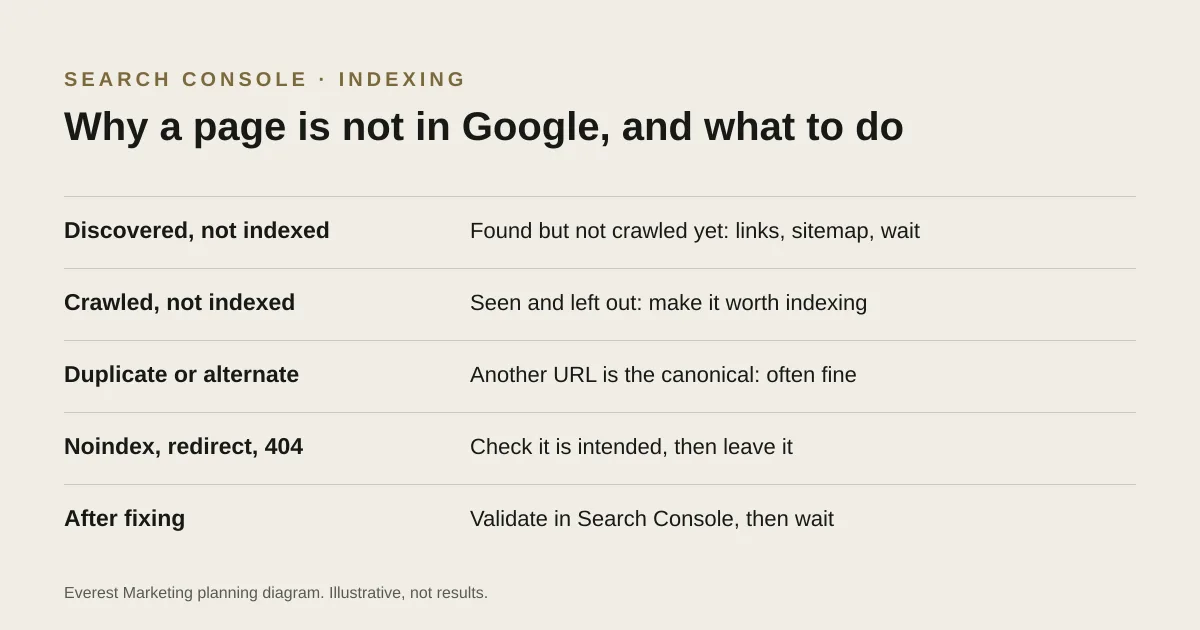
Search Console lists a reason for every page Google has not indexed. Some reasons are normal: a duplicate URL whose canonical is indexed, a redirect, or a page you marked noindex on purpose. “Discovered – currently not indexed” means Google knows the page but has not crawled it yet. “Crawled – currently not indexed” means Google looked and left it out for now. Google does not promise to index every page, so the fix is usually to make the page clearly useful and distinct, link to it from relevant pages, and then wait rather than resubmit.
You build a page for a service you want more work in, and weeks later it still does not show up in Google. Search Console can tell you why. This guide explains what each common status means for a small service business site, which ones are worth acting on, and what to check first.
Where to look
In Search Console, open Indexing → Pages. The report shows how many pages are indexed and groups the rest by reason. Click a reason to see example URLs. To check one page, paste its address into the URL Inspection bar at the top. Google’s own help page for the report explains every status; the common ones are below.
What the statuses mean
| Status | What Google says | Usually needs action? |
|---|---|---|
| Discovered – currently not indexed | Google found the page but has not crawled it yet | Sometimes. Check it is linked and in the sitemap, then wait |
| Crawled – currently not indexed | Google crawled it; it may or may not be indexed in the future; no need to resubmit | If it is a page you care about, yes: improve the page |
| Duplicate without user-selected canonical | A duplicate of another page, with no preferred version marked. Google says this is working as intended | Only if Google picked the wrong version |
| Alternate page with proper canonical tag | Points to the canonical page, which is indexed | No |
| Excluded by ‘noindex’ tag (the help page calls it “URL marked ‘noindex’”) | Google found a noindex directive and did not index the page | Only if the noindex was a mistake |
| Page with redirect | Redirects to another URL, so it will not be indexed itself | No, if the redirect is intended |
| Not found (404) | The page returned a 404. Google says this is not necessarily a problem if the page was removed | Only if the page should exist, or has a replacement |
Two lines from Google’s help page are worth keeping in mind: Google does not guarantee that every page will be indexed, and you should not expect every URL on your site to be indexed, only the canonical ones. A long list of excluded URLs is normal, especially on sites with filters, tags or old redirects.
Step-by-step check for a page you care about
- Inspect the URL. Confirm it returns a normal page, not a redirect, an error or a login screen.
- Check there is no noindex tag and that robots.txt does not block it.
- Check the canonical tag points to the page itself, not the homepage or another service.
- Check the page is in your XML sitemap.
- Check at least one other page links to it with a normal link: the menu, the homepage, a related service or a guide.
- Read the page as a customer. Is it clearly about one service, with details another page on your site does not already cover?
Fixing “Discovered – currently not indexed”
Google knows the URL exists but has not fetched it. On a small site this is often a new page that nothing links to yet, or a page that only appears in the sitemap. Add links to it from relevant pages, make sure it is in the sitemap, and give it time. If thousands of low-value URLs, such as tag archives or search results, are also waiting, they may be competing for Google’s attention; noindexing or removing them is a separate clean-up.
Fixing “Crawled – currently not indexed”
Google fetched the page and chose not to index it, at least for now. For a service business, the usual causes are pages that are thin or too similar to each other:
- Suburb pages with the same text and only the place name changed. Google’s spam policies describe pages like these, built for regions or cities that funnel people to one place, as doorway abuse.
- Service pages that say almost nothing: a heading, two sentences and a contact form.
- Several pages covering the same service under slightly different names.
The fix is to make the page genuinely worth indexing: what the service includes, who it suits, the areas you cover, how pricing or quoting works, your own photos of the work, and answers to real customer questions. If two pages cover the same thing, combine them and redirect the weaker one. Then link to the improved page from related pages.
After you have made real changes, you can use Validate fix in the report or request indexing for a single URL through URL Inspection. Google’s help page says crawled-not-indexed URLs do not need resubmitting, so this is optional, and it does not guarantee indexing.
When the wrong page is chosen
If Google says your service page is a duplicate and has chosen a different URL as the canonical, look at the two pages side by side. Often it is a near-identical version, such as with and without a trailing slash, or an old page that was never redirected. Pick one, point the canonical tag at it, redirect or remove the other, and update internal links to use the chosen URL.
What not to do
- Do not keep requesting indexing for an unchanged page.
- Do not create more near-identical pages to cover more suburbs.
- Do not remove noindex from pages that were meant to stay out of search, such as thank-you pages, private areas or test pages.
For the wider set of technical checks, see our technical SEO checklist for small businesses. Linking is often the simplest fix here, and our guide to internal linking for a service business website covers how to do it well.
Sources
- Page indexing reportSearch Console Help, accessed 28 October 2026. Defines each indexing status; Google does not guarantee every page will be indexed, and crawled-not-indexed URLs need not be resubmitted
- How to specify a canonical URLGoogle Search Central, accessed 28 October 2026
- Spam policies for Google web search: doorway abuseGoogle Search Central, accessed 28 October 2026
- Link best practices for GoogleGoogle Search Central, accessed 28 October 2026. Crawlable a elements with href, descriptive anchor text, every important page linked from at least one other page, no ideal number of links