
Who owns your website, domain and ad accounts? A checklist before you change provider
Check who controls your domain, website, hosting, Google Ads, Analytics, Search Console and Meta accounts, and how to fix it before you change agency or developer.
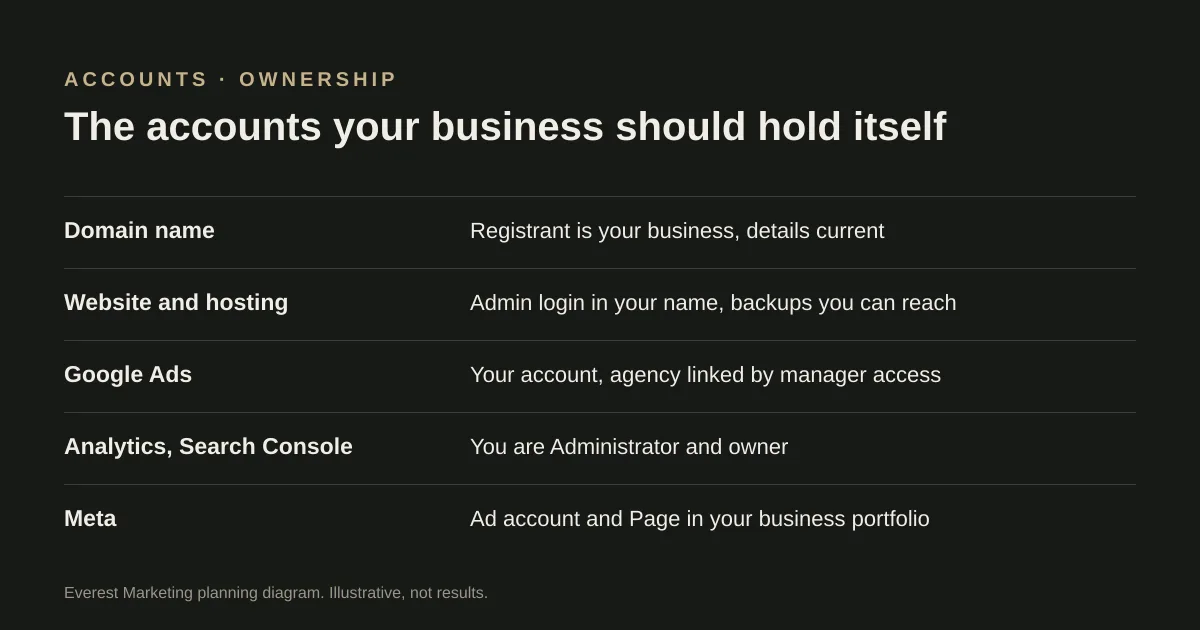
Your business should be the registrant of its domain, hold admin logins for the website and hosting, and own its Google Ads, Google Analytics, Search Console and Meta accounts, with agencies given access rather than ownership. Check each account now, while relationships are good: who is listed as the owner or administrator, whose email is on it, and who pays. Fix gaps before you change provider, because getting access back afterwards is slower and sometimes impossible.
Most account problems surface at the worst moment: when a developer stops replying, an agency relationship ends, or the staff member who set everything up has left. The fix is boring and quick if you do it early. This checklist covers the accounts a typical Australian service business relies on.
The principle: own it, give access
Agencies and developers need access to do their work. They do not need to own your accounts. The business should hold the top level of each account, and add providers with the access level they need. When the work ends, you remove their access; nothing needs to be handed back.
Domain name
- For a .com.au domain, the registrant recorded with the registrar should be your business. auDA’s licensing rules describe a .au domain as a licence rather than property, held by a registrant who must keep an Australian presence and keep their details accurate.
- Log in to the registrar account yourself. Check the account email is one you control, not a former staff member’s or the developer’s.
- Check the renewal date and turn on auto-renew. auDA’s rules set licence periods of one to five years, with a window to renew before and shortly after expiry.
- Note who manages the DNS. If it points to a provider you no longer use, ask your developer to explain the move before changing anything, because email can depend on the same settings.
Website and hosting
- Have your own administrator login for the website, not a shared one.
- Know where it is hosted, whose account pays for it, and how to get a copy of the site and its backups.
- For a custom-built site, ask who holds the code and whether your agreement gives you the right to keep using it if you change developer.
Our website maintenance checklist includes a yearly access review that keeps this current.
Google Ads
- The account should be in your business’s name, with your payment details.
- Google Ads access levels range from email-only and billing through read-only and standard to Admin. Only Admins can add or remove people and accept or unlink manager accounts.
- Agencies usually connect through a manager account link. That lets them work in your account without owning it; you can unlink it later.
- Google recommends having more than one Admin, so the account is not stranded if one person becomes unavailable.
Google Analytics and Search Console
- In Google Analytics, someone at your business should hold the Administrator role, which is the only role that can manage users. Roles set at account level apply to every property beneath it.
- In Search Console, check Settings → Users and permissions and make sure your business is listed as an owner.
Meta (Facebook and Instagram)
- Your Facebook Page, Instagram account and ad account should sit in your own business portfolio, with a partner or agency given access to them.
- Meta’s Business Help Centre describes two levels, full control and partial access, for the portfolio and for individual assets. Give agencies only what they need.
- Check carefully before an agency creates a new ad account for you inside their portfolio. Ask how it would be handed over if you part ways, because moving assets between portfolios is restricted.
We could not read Meta’s help page directly, so check the current version before relying on the details.
The checklist
- Domain: registrant is the business, account email is yours, auto-renew on.
- Website: your own admin login; you know the host and can get a backup.
- Google Ads: business owns the account and payment; at least two Admins; agency linked through a manager account.
- Google Analytics: someone at the business is Administrator.
- Search Console: business listed as owner.
- Meta: Page, Instagram and ad account in your business portfolio; agency added as a partner.
- Google Business Profile: you are an owner, not only a manager.
- Remove access for anyone who no longer works with you.
Before you change agency or developer
- Confirm in writing which accounts are in your name and which are in theirs.
- Transfer or add you as owner or administrator on anything in their name, before the end date.
- Export reports and settings you will want later, such as conversion definitions and audience lists.
- Hand over passwords through a password manager or a secure method, not email.
When the new provider starts, add them the same way: access, not ownership.
Sources
- .au Domain Administration Rules: LicensingauDA, accessed 28 October 2026. The registrant holds a licence, not ownership (2.3.3); Australian presence throughout the licence (2.11.5); accurate details, changes reported within 14 days (2.11.8–2.11.9); renewal windows (2.14)
- About access levels in your Google Ads accountGoogle Ads Help, accessed 28 October 2026. Email-only, Billing, Read-only, Standard and Admin; only Admins manage access and manager-account links; Google recommends more than one Admin
- Access roles and data restrictionsGoogle Analytics Help, accessed 28 October 2026. Administrator has full control including user management; roles are inherited from account to property
- About business portfolio and business asset permissionsMeta Business Help Centre, accessed 28 October 2026. The page did not render for our checker; full control and partial access were confirmed from Meta’s published summaries only. Check the current page
- Guidelines for representing your business on GoogleGoogle Business Profile Help, accessed 28 October 2026. Service-area businesses should hide their address; virtual offices are not eligible unless staffed