
Website maintenance checklist for small businesses
A website maintenance checklist for small businesses: what to check monthly, quarterly and yearly, and what to ask whoever looks after your site.
Every month, test each enquiry form and confirm the message arrives, and make sure updates and backups are happening (on WordPress you or your developer do this; hosted platforms update their own software). Every quarter, check that prices, hours, services and photos are still true, and look at Search Console for errors and broken links. Every year, confirm your domain renewal, who has access to what, and that you, not only a contractor, own the accounts.
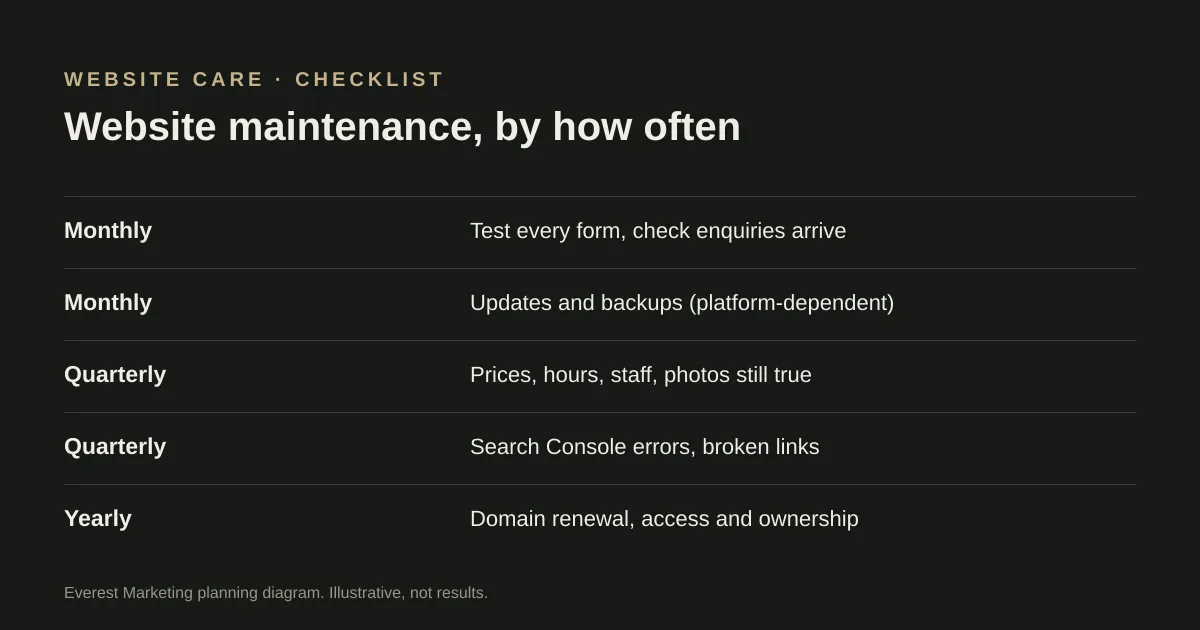
Websites rarely break all at once. A form stops sending, a plugin goes out of date, an old price stays up for a year, a domain renewal email goes to someone who left. Each one is small, and each one costs enquiries. A short routine catches most of them.
The checklist by how often
| How often | Task | Why it matters |
|---|---|---|
| Monthly | Submit a test enquiry through every form and confirm it arrives where it should | A form can show “thank you” while the message goes nowhere |
| Monthly | Check updates and backups have run (see platform notes below) | Updates include security fixes, so skipping them leaves known problems unpatched |
| Monthly | Click your phone number and email links on a phone | The quickest enquiries are the easiest to lose |
| Quarterly | Read your main pages: prices, hours, services, staff, service areas, photos | Out-of-date details cost trust and can mislead customers |
| Quarterly | Check Search Console for indexing problems and pages returning errors | Problems can show up there before anyone notices traffic dropping |
| Quarterly | Look for broken links and missing images | They make a site feel neglected |
| Yearly | Confirm domain renewal, auto-renew and the contact email on the domain account | An expired domain takes the site and email down |
| Yearly | List who has access to the website, hosting, domain, analytics and Business Profile | Former staff and contractors can keep access long after they leave |
| Yearly | Restore a backup somewhere safe, or ask your developer to show you one works | A backup that cannot be restored is not a backup |
For the yearly access check, our account ownership checklist goes through each account in turn.
What depends on your platform
- WordPress and other self-hosted sites: the core software, themes and plugins need updating, and WordPress’s own documentation says it is a good idea to back up before you update. This is the part to hand to someone else if you would rather not do it yourself.
- Hosted platforms such as Squarespace, Wix or Shopify update the platform software themselves. You are still responsible for content, forms, apps you add, and who can log in.
- Custom-built sites depend on how they were built and hosted. Ask the developer what needs updating, how often, and who does it.
If you are choosing a platform, our Squarespace vs WordPress vs custom comparison covers the maintenance each one needs.
What to ask whoever looks after your site
- What is updated, how often, and how will I know it happened?
- Where are backups kept, how long for, and when was one last restored?
- If the site goes down or a form stops working, how quickly will you respond?
- Who owns the domain, hosting and analytics accounts? Are they in my name?
- What is included in the monthly fee, and what is charged separately?
Care plans covering updates, backups and small edits are often sold as a monthly fee. One Australian price guide puts typical care plans at around $50–$300 a month; it is a third-party estimate, and what is included varies a lot. Our website cost guide explains the ongoing costs in more detail.
The two checks people skip
Testing the forms properly
Fill in each form as a customer would, on a phone, and check the message reaches the inbox or CRM it is meant to. Then delete or label the test so it does not end up in your reporting. If you only ever look at the thank-you screen, you will not notice the day delivery stops.
Keeping the details true
Prices, services, service areas, team photos and opening hours drift out of date quietly. Put a recurring reminder in your calendar to read your main pages as if you were a new customer. Anything you would not say on the phone should not be on the site.
Once a year, it is also worth running a few quick accessibility checks: keyboard access, contrast, form labels and alt text.
Signs your site needs more than maintenance
- It is hard to update without breaking something.
- It is slow or awkward on a phone, and fixes do not stick.
- The platform or theme is no longer supported.
- It no longer describes the business you run now.
At that point it may be time to rebuild rather than patch. Our website redesign checklist covers how to do it without losing your search rankings.
Sources
- Updating WordPressWordPress.org documentation, accessed 25 October 2026
- Web design cost in AustraliaWhat’s The Damage? (Focus Search Pty Ltd), prices verified October 2026, accessed 25 October 2026. Third-party estimate. The publisher also sells listings to web design agencies
- Learn about sitemapsGoogle Search Central, accessed 25 October 2026
- Forms tutorialW3C Web Accessibility Initiative