
Google Ads conversion tracking for service businesses: set it up and check it works
How a service business can count enquiries and calls as Google Ads conversions, what the conversion statuses mean, and how to troubleshoot tracking that looks wrong.
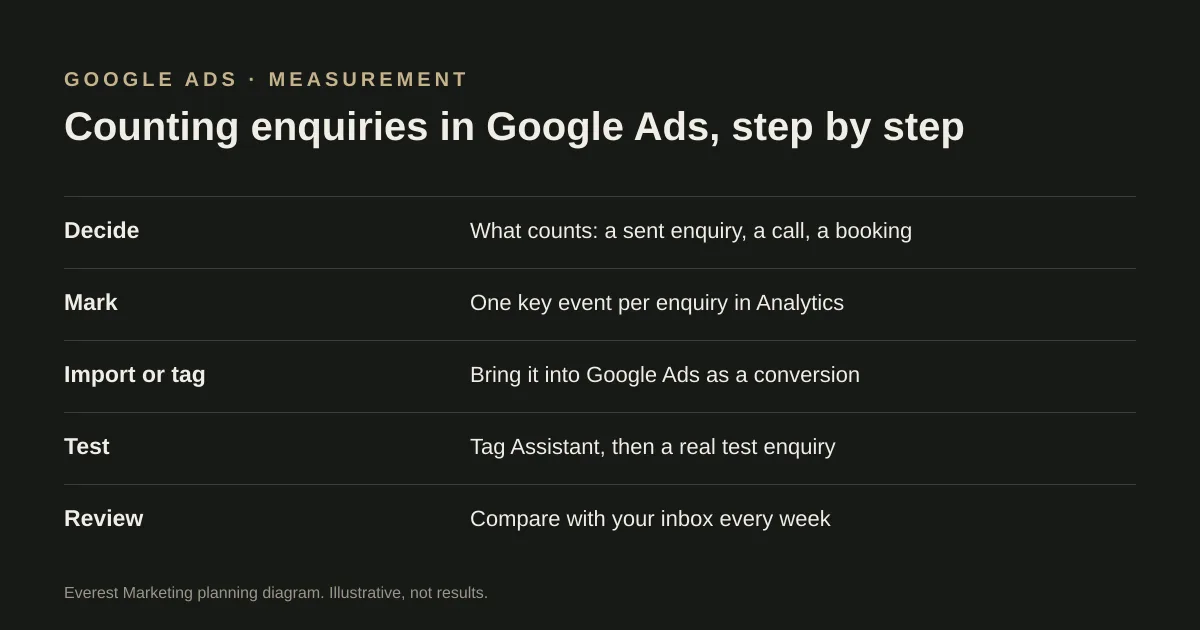
Decide what counts as a conversion first: usually an enquiry your form provider has accepted, and a phone call of a reasonable length. Record each one once, either by importing a Google Analytics key event or with a Google Ads conversion tag. Then test it with Google’s Tag Assistant and a real test enquiry, and compare the conversions Google Ads reports with the enquiries that actually reached you. Statuses such as “Unverified” or “No recent conversions” tell you where to look.
Google Ads uses conversions to report results and, if you use automated bidding, to decide which searches to bid on. If it counts the wrong thing, such as a button click or a visit to the contact page, the reports look better than reality and the bidding learns from the wrong signal. For a service business, getting this right matters more than almost any other setting.
Decide what counts
| Action | Count it as a main conversion? | Why |
|---|---|---|
| Enquiry form accepted by your form provider | Usually yes | It is the closest website signal to a real enquiry |
| Phone call from an ad (call reporting) | Usually yes, with a minimum length | Many service enquiries are calls; Google can count calls from ads and from your website number |
| Click on a phone number or email link | Usually no | It shows interest, not that a conversation happened |
| Visit to the contact or thank-you page | No | A page view can happen without an enquiry, and can be counted twice |
| Booked job or qualified lead | Yes, if you can record it | Google Ads can import offline conversions from your records; it needs a reliable process |
Google’s help describes a conversion action as a specific customer activity that is valuable to your business, and lists website actions, phone calls and offline imports among the things you can measure. Keep secondary actions, such as phone link clicks, as secondary so they do not drive bidding.
Two ways to record a website enquiry
- Import a Google Analytics key event. Google’s help says only events marked as key events in Analytics can be imported, the accounts must be linked, and the import options can take 24 to 48 hours to appear. This keeps one definition of an enquiry across both tools.
- Use a Google Ads conversion tag, usually through the Google tag or Tag Manager, fired when the enquiry is accepted.
Pick one per enquiry. Running both for the same action, and counting both, records every enquiry twice. If you are setting up the Analytics side, our guide to tracking leads from click to customer explains how to fire the lead event only after the form provider confirms it accepted the submission.
What the statuses mean
In Google Ads, open Goals → Conversions → Summary. Each conversion action shows a status. Google’s help pages describe them along these lines:
| Status | What it usually means | What to check |
|---|---|---|
| Unverified | Google has not yet seen the tag fire for this action | The tag is installed on the right pages and fires on the right trigger |
| No recent conversions | The tag has been verified, but no conversions were recorded recently | Whether ads are sending people to the page, and whether anyone actually enquired |
| Tag inactive | Google no longer detects the tag | Whether the tag was removed, for example in a redesign or plugin change |
| Recording conversions | Conversions are coming in | That the numbers match your real enquiries |
Troubleshooting, in order
- From the conversions summary, hover over the status and choose Troubleshoot. Google’s Tag Assistant opens your site and asks you to trigger the conversion.
- Submit a clearly labelled test enquiry, then check it reached your inbox or CRM, and whether the conversion was recorded.
- If you use Tag Manager, check the conversion linker and that the conversion tag fires on the accepted-enquiry trigger, not on every button click.
- Look for double counting: the same enquiry recorded by an imported key event and by a tag, or a thank-you page that fires on refresh.
- Check the conversion action is set as a primary action if you want it to drive bidding, and as secondary if not.
- After a website change, recheck. A redesign or a new form plugin can stop a tag firing without anyone noticing.
Compare with what actually arrived
The test that matters is simple: for the same week, compare the conversions Google Ads reports with the enquiries that reached you from ads. They will rarely match exactly, because of consent choices, attribution windows and timing. But a big gap in either direction means something is miscounting. Note the dates and the cause in a simple log, so the next person who looks at the account knows what changed.
Once enquiries are counted properly, you can judge the cost. The qualified lead cost calculator works out what you are really paying per useful enquiry, and our guide to Google Ads for tradies covers call assets and call reporting.
Sources
- About conversion measurementGoogle Ads Help, accessed 28 October 2026. Conversion actions; website, call and offline imports; only Google Analytics key events can be imported; import options can take 24–48 hours to appear
- Use Tag Assistant to troubleshoot unverified or inactive conversion actionsGoogle Ads Help, accessed 28 October 2026. Troubleshoot from the conversions summary; verified actions show as “No recent conversions” until a conversion is recorded
- Events and key eventsGoogle Analytics Help, accessed 28 October 2026. Any event can become a key event; a Google Ads conversion can be created from an Analytics key event
- Recommended events reference (generate_lead, qualify_lead, close_convert_lead)Google for Developers, accessed 28 October 2026
- About call assetsGoogle Ads Help, accessed 28 October 2026. Call assets add a phone number to ads; call reporting uses Google forwarding numbers and can count calls as conversions