
What to ask in a Meta lead form: example questions for service businesses
Example Meta lead form questions for detailers and event businesses: why each field earns its place, what to leave out, and how to review the leads that arrive.
Ask for what you need to make a useful first reply, and stop there. For many local service businesses that is the service wanted, the suburb or postcode, the timing and one question about the size of the job, plus the contact details Meta can prefill. Every extra question should change who replies, what you quote or whether you can take the job. If it would not change your first message, leave it out and ask on the call.
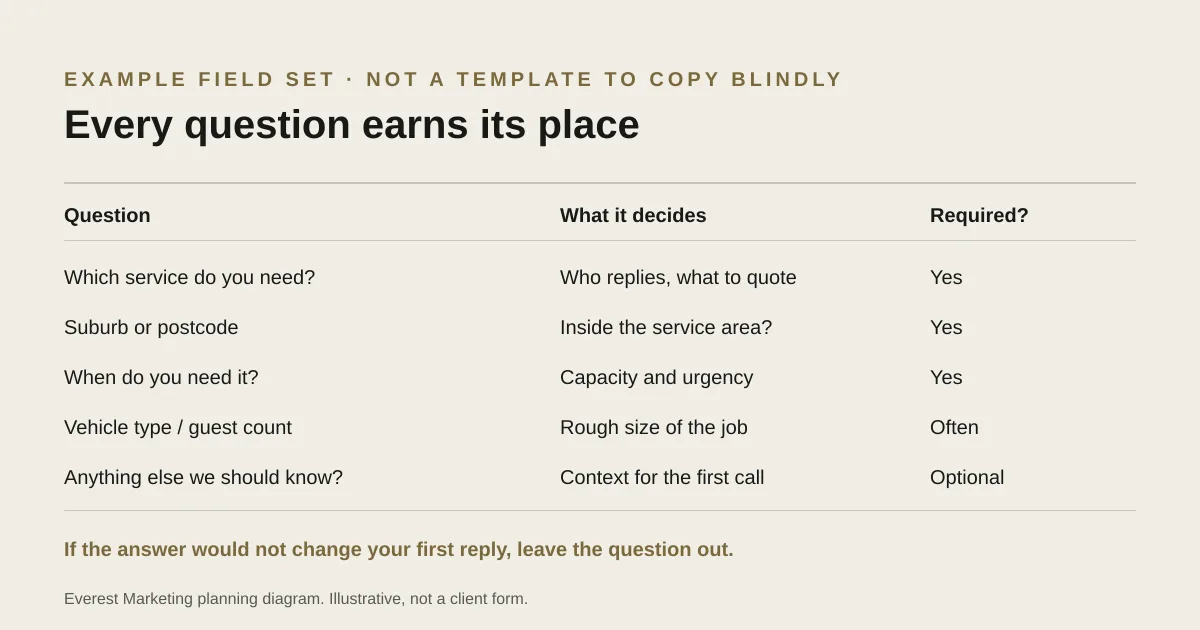
A Meta lead form is a short conversation with someone who was scrolling a moment ago. Ask too little and you get a name and a phone number with no idea what they want. Ask too much and they close the form. The aim is the smallest set of questions that lets you reply with something useful.
Start from your first reply
Write the message you would like to send a new lead within the hour. For a detailer it might be: “Hi Sam, thanks for asking about the full detail on your SUV in Parramatta. I can do Thursday or Saturday next week, it’s usually around two and a half hours.” Now list what you needed to know to write it: the service, the vehicle, the suburb and the rough timing. Those are your questions. Everything else can wait.
The two kinds of question Meta offers
Meta’s documentation describes prefill questions, such as full name, email and phone number, which can be filled from the person’s account, and custom questions you write yourself. A custom question can be open text or a set of options. Options are faster on a phone and easier to sort later, so use them whenever the answers fall into a short list.
Example question set: a mobile car detailer
This is an illustrative set for a hypothetical detailer. Adjust the options to the services and areas you actually cover.
| Question | Type | Why it earns its place | Required? |
|---|---|---|---|
| Which service are you interested in? | Options: interior, exterior, full detail, paint correction, ceramic coating, not sure | Decides who replies and roughly what to quote | Yes |
| What are you driving? | Options: small car, sedan, SUV, 4WD or van | Changes time and price | Yes |
| Which suburb is the car in? | Short answer | Confirms you service the area, and how far you travel | Yes |
| When would you like it done? | Options: this week, next 2 weeks, this month, just getting prices | Shows urgency and helps you plan capacity | Yes |
| Anything we should know? | Short answer, optional | Pet hair, stains, a sale deadline | No |
| Name, phone, email | Prefill | So you can reply | Yes |
Example question set: an event stylist or hire business
For an event business, the date and the venue decide whether you can take the job at all, so those come first. Again, this is illustrative.
| Question | Type | Why it earns its place | Required? |
|---|---|---|---|
| What is the occasion? | Options: wedding, engagement, birthday, corporate, other | Different packages and lead times | Yes |
| What is the event date? | Date, or “not set yet” | The first thing you check: are you free? | Yes |
| Where is it being held? | Short answer: venue or suburb | Delivery, access and whether you travel there | Yes |
| Roughly how many guests? | Options: under 30, 30–80, 80–150, 150+ | The rough size of the job | Often |
| What are you looking for help with? | Options to suit your services | Separates a full styling job from a small hire order | Yes |
| Name, phone, email | Prefill | So you can reply | Yes |
If you take enquiries through your website as well, keep the two forms consistent so leads are easy to compare. Our wedding and event enquiry form guide covers the website side, including how to ask about budget without making it awkward.
Questions to leave out or make optional
- Budget as a required field. Many people do not know yet, and a forced guess filters out good customers. If you ask, offer ranges and a “not sure yet” option.
- Full street address. The suburb or postcode is enough to check the service area. Get the address when you book.
- Date of birth, licence numbers, anything sensitive. You are unlikely to need it at enquiry stage, and collecting it can add privacy and security obligations.
- “How did you hear about us?” The lead came from your ad, and Meta’s lead data already records which ad and form it came from.
- Long free-text boxes as required fields. Typing is slow on a phone. Keep required typing to a minimum, use options where you can, and check the form’s completion rate after any change.
As a general principle, collect only what you need for the purpose. The Office of the Australian Information Commissioner publishes the Australian Privacy Principles; whether they apply to your business depends on factors such as turnover and the kind of information involved, so check with an adviser if unsure. For the form itself, three things are worth separating. Meta’s Help Centre describes a privacy policy link as a requirement when you create a lead ad form; check the current page and the form builder when you set yours up, because the wording changes. Meta’s Lead Ad Terms go further and make you responsible for any disclosures the law requires, for giving people a way to contact you, and for getting consent where it is needed, and they prohibit selling lead data. And the technical form settings (the API) list the privacy policy as a field without marking it mandatory, which tells you nothing about what Meta or the law expects of you. In short: link a real privacy policy that explains how you use enquiry details.
Does one more question cost you leads?
It can, and that can be a good trade. A required question about timing may reduce the number of forms submitted while making the ones you receive far easier to act on. The way to find out is to judge the change on suitable enquiries and booked work, not on the number of forms. If casual submissions are the main problem, Meta’s review-and-confirm (higher intent) form option adds a step for the same reason. See our comparison of instant forms and landing pages if you are still deciding between the two.
Check the answers when leads arrive
Good questions only help if someone reads the answers. Review each new lead against the same short checklist, and record the result where your team already works. These are suggested working definitions, not universal rules; agree your own before a campaign starts.
- Received: the lead reached the inbox or CRM, not just Leads Center. Test leads are marked as tests.
- Real: the contact details look genuine. Obvious junk is set aside, not counted.
- Contacted: someone has tried to reach them, with the date and method recorded.
- In area: the suburb or venue is somewhere you actually service.
- Service fit: they want something you offer, at a size you take on.
- Timing: the date or urgency is something you can meet.
- Next step: quote sent, booking made, or a clear reason it stopped.
Keep “not contacted yet” separate from “unsuitable”. A lead nobody called is a follow-up problem first, whatever the targeting. Our lead qualification guide explains how to turn these checks into pipeline stages, and the qualified lead cost calculator shows what each suitable enquiry actually cost.
Before you publish the form
- Submit a test lead from your own phone and confirm where it arrives.
- Read every question aloud. Would a customer understand it without context?
- Check every multiple-choice list has a sensible “other” or “not sure” option.
- Make sure the intro screen says what you offer and the thank-you screen says what happens next.
- Delete the test lead, or mark it clearly, so it does not end up in your reporting.
Sources
- Lead Ad TermsMeta, accessed 28 October 2026. Advertiser obligations: disclosures required by law, a contact mechanism, consent where necessary; lead data may not be sold
- About privacy policies for lead adsMeta Business Help Centre, accessed 28 October 2026. Describes a privacy policy link as required for lead ad forms. The page did not render for our checker, so this was confirmed from Meta’s published page summary only; check the current page
- Create a lead ads form (Marketing API)Meta for Developers, accessed 28 October 2026. Documents prefill and custom question types, and the default volume setting versus the review-and-confirm step
- Page leadgen forms reference (Graph API)Meta for Developers, accessed 28 October 2026. Lists the privacy_policy field (URL and link text) without marking it required. This is API field optionality, not a statement of advertiser obligations
- Retrieving leads (Marketing API)Meta for Developers, accessed 28 October 2026. Each retrieved lead includes ad_id, form_id and created_time
- About lead ads with instant formsMeta Business Help Centre, accessed 28 October 2026. Help Centre wording and settings change; check the current page and Ads Manager before relying on any detail
- Supported features of lead ads with instant formsMeta Business Help Centre, accessed 28 October 2026. Feature availability varies by placement and device; check the current page
- Australian Privacy PrinciplesOffice of the Australian Information Commissioner, accessed 28 October 2026. General reference only. Whether the Privacy Act applies depends on the business; this guide is not legal advice
- How lead qualification works for service businessesEverest Marketing