
Meta instant forms or a landing page: which fits a service business?
Compare Meta instant forms and landing pages on effort, context, lead delivery and measurement, with a decision worksheet and test plan for service businesses.
Use an instant form when the offer is simple, the customer already understands it and your team can call or message every lead quickly. Use a landing page when people need proof, scope or pricing context before they enquire, or when you need the enquiry to arrive through the same form and tracking as the rest of your website. Neither is always cheaper or better: judge them on how many contactable, suitable enquiries each produces, not on the cost per form submitted.
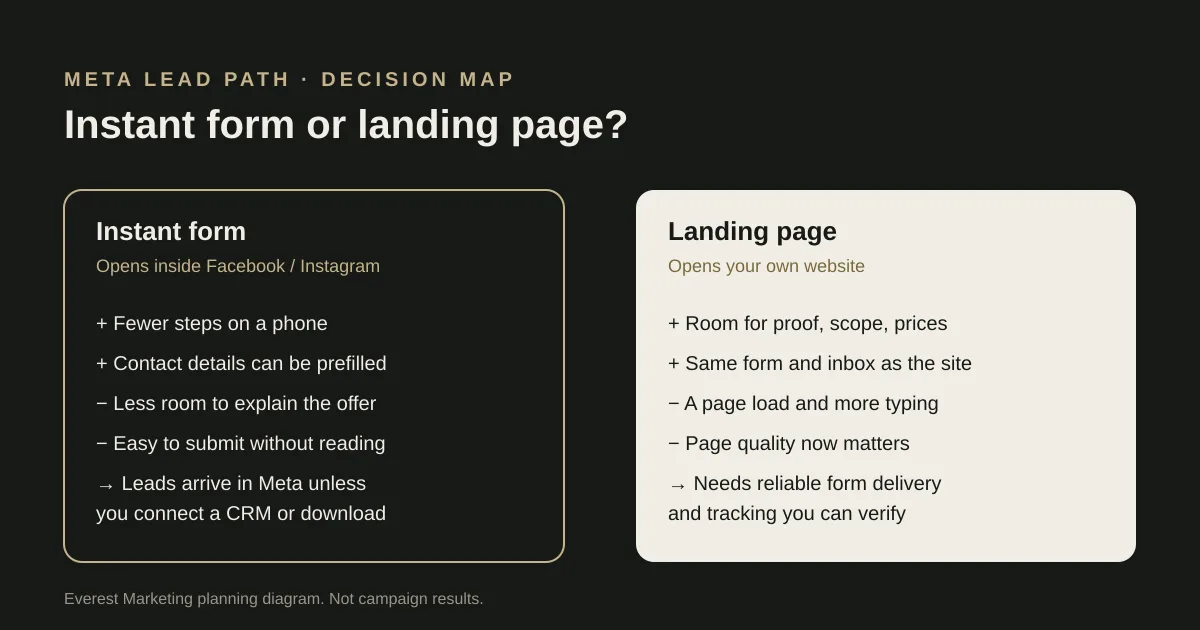
This is one of the first decisions in a Meta lead campaign, and it can end up being made by habit. Some advertisers swear by instant forms because the leads look cheap; others refuse to use them because “the leads are rubbish”. Both camps may really be describing their own offer and follow-up process rather than the format itself.
What each option actually is
An instant form opens inside Facebook or Instagram when someone taps the ad. Meta can prefill details such as name, email and phone number from the person’s account, and you can add your own questions. Meta’s developer documentation notes that forms are optimised for lead volume by default, and that a review-and-confirm step can be added to favour quality instead. In Ads Manager this is usually presented as a form type choice; the label can change, so check the current interface.
A landing page is a page on your own website, built for the ad. The visitor leaves the app, the page loads, and they fill in your normal enquiry form or call you. Everything after that depends on your website: whether the page explains the offer, whether the form is easy to use on a phone, and whether the enquiry reliably reaches your inbox or CRM.
The comparison that matters
| Question | Instant form | Landing page |
|---|---|---|
| Effort for the customer | Low. A few taps, often with details prefilled. | Higher. A page load, reading, then typing. |
| Room to explain the offer | Limited to the ad and a short intro screen. | As much as the page needs: scope, photos, prices, FAQs. |
| Risk of half-hearted enquiries | Can be higher, because it is easy to submit without reading. | Can be lower, because the visitor chose to read first. Check this against your own leads. |
| Where the lead arrives | In Meta (Leads Center or download) unless you connect a CRM or another tool. | Wherever your website form already sends enquiries. |
| What you need to measure it | A way to see form leads beside your other enquiries and their outcomes. | A tracked form or call event that fires only when an enquiry is accepted. |
| What can go wrong quietly | Nobody checks the Leads Center, so leads sit unanswered. | The form breaks or the page is slow on mobile data. |
When an instant form is the better fit
- The service is easy to understand from the ad alone, such as a standard detail package or a known seasonal service.
- Your team phones or messages every lead promptly, so a short form is enough to start the conversation.
- You do not yet have a page that does a better job than the ad itself.
- You can get the leads out of Meta reliably, either by checking daily or by connecting them to your CRM.
When a landing page is the better fit
- People need context before they are ready to talk: what is included, typical price ranges, real photos of your work or the service area.
- The job is higher value or more considered, so it helps if customers understand the scope and price range before they contact you.
- You want every enquiry, from ads, search and referrals, to arrive through one form and be measured the same way.
- Your website form has been tested end to end, and the page is fast and usable on a phone.
If the landing page is just your homepage, the comparison is not fair to the landing page. A page built for one offer, with one clear next step, is a different thing from a general site. Our website design page shows how we scope that work, and we keep the form and tracking checks in the same job.
Two worked scenarios
Both scenarios are hypothetical, written to show the reasoning. They are not Everest client results.
A mobile car detailer
A detailer advertising a fixed interior-and-exterior package across a few suburbs has a simple offer that photographs well. The ad can carry the before-and-after work, and an instant form with three questions (package, suburb, preferred week) gives the owner enough to text back a time. Here an instant form is a reasonable first test, provided someone answers every lead the same day. If ceramic coating is the main service, the answer may change: customers may want to understand the process and price range first, which suits a landing page.
An event stylist
An event stylist quoting for weddings and milestone parties sells something people compare carefully. Couples want to see real styling, understand what is included and check the date is free. An instant form would collect names, but many would be early browsers. A landing page with a gallery, a clear scope of services and a short enquiry form asking for date, venue and guest count may produce fewer but more useful enquiries; the test log below is how to find out. Our wedding and event enquiry form guide covers that form in detail.
A decision worksheet
- Can someone understand the offer from the ad alone? If not, lean towards a landing page.
- Who sees a new lead, and how quickly do they respond? Write the name down.
- Where will instant form leads go: Leads Center, a download, or a CRM connection? Has it been tested?
- Is there a page that explains this offer better than the ad does? If not, building one is a separate job.
- Has the website form been tested from a phone, with the enquiry confirmed in the inbox?
- What counts as a useful enquiry for this service? Use the same definition for both formats.
How to test both without fooling yourself
If you are unsure, test. Keep it simple: the same offer, the same audience and similar creative, with only the lead path changing. Give each version long enough to produce a meaningful number of enquiries before judging it; a handful of leads either way tells you very little.
| Version | Spend | Leads submitted | Contacted | Suitable | Quoted or booked |
|---|---|---|---|---|---|
| Instant form | $ | ||||
| Landing page | $ |
Compare the right-hand columns, not the left. A cheap lead that never answers the phone is not a cheap lead. If you want the arithmetic done for you, the qualified lead cost calculator divides spend by accepted and suitable enquiries separately, and our lead qualification guide helps you agree what “suitable” means before the test starts.
Making whichever you choose work
- Ask only the questions that change your first reply. Our guide to Meta lead form questions has example sets.
- Consider the review-and-confirm (higher intent) option if casual submissions are the problem.
- Use the intro and thank-you screens to say what happens next and roughly when.
- Get leads out of Meta into the place your team already works, and check it daily until that is automatic.
- One offer, one next step. Match the headline to what the ad promised.
- Show genuine proof: your own photos, real scope, honest price guidance if you can give it.
- Test the form on a phone, then confirm the enquiry arrived. A thank-you screen alone is not proof.
- Record an enquiry event only after the form has been accepted, so tracking counts real enquiries.
Our guide to tracking Meta Ads leads from click to customer explains how to check each of those handoffs.
Sources
- Create a lead ads form (Marketing API)Meta for Developers, accessed 28 October 2026. Documents prefill and custom question types, and the default volume setting versus the review-and-confirm step
- About lead ads with instant formsMeta Business Help Centre, accessed 28 October 2026. Help Centre wording and settings change; check the current page and Ads Manager before relying on any detail
- Lead ads guide (Marketing API)Meta for Developers, accessed 28 October 2026. Covers retrieving leads by webhook, bulk read and Leads Center
- How lead qualification works for service businessesEverest Marketing
- How to track Meta Ads leads from click to customerEverest Marketing